YouTube on the N900 again: NotPipe, nplay and a modern ffmpeg
The old YouTube clients of the N900 are dead, and the YouTube application of the phone has not worked for years. A tip about notPipe (a YouTube client for old Android phones, by gohoski, WTFPL) showed another way: do not ask YouTube, ask a public Invidious server, take two plain files from it and play them yourself. This is how that became three packages for the N900, what the phone can really play, and what does not work.
How it works
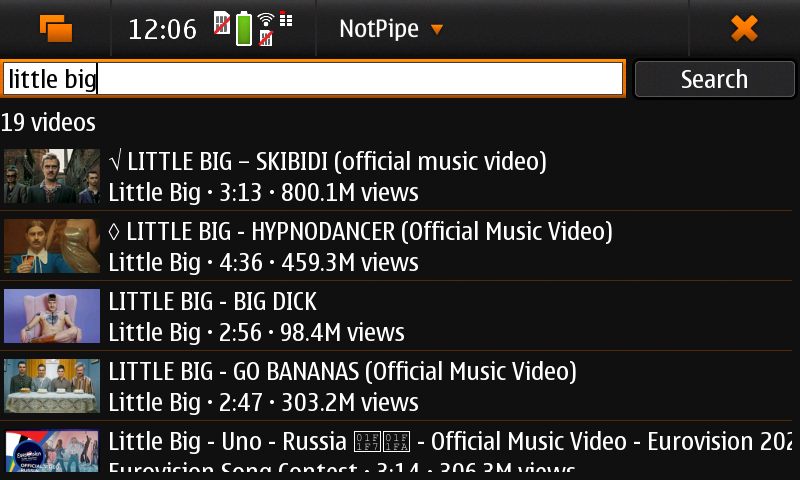
- NotPipe (the application, notpipe-hildon) sends your search to an Invidious instance and shows the list with thumbnails. It is not YouTube: the instance does the work that the browser would do, and answers with a small JSON.
- For a video the instance gives the addresses of the streams. YouTube no longer serves one file with picture and sound, it serves them apart (DASH): H.264 video in MP4 (144p, 240p, 360p, …) and AAC audio. NotPipe takes the best one that fits the quality you set (240p by default).
- The streams are downloaded with
curlin pieces of 4 MB. One long request is throttled by the server to about 20 kB/s here; pieces of 4 MB run at 130 to 800 kB/s, and a trailer of 2.5 MB takes a few seconds. - nplay plays the two files together. Nothing is joined first.
Why a player of our own
The player of the phone could not do it. We measured, on the same 360p stream:
- GStreamer with the
ffdec_h264decoder of the system: 5 to 10 frames per second even at 144p. The hardware decoders (the DSP,omx) refused the streams: the DSP of the N900 decodes only the Baseline profile, and YouTube sends Main and High. - The old
mplayerof the repository segfaults on these files. - A modern ffmpeg 9.0.2 built for the N900 (ARMv7 with NEON, a static build with only the parts that are needed: MP4, Matroska, MP3, Ogg and AAC demuxers; H.264, AAC, MPEG-4, VP8, Opus and MP3 decoders): 39 frames per second at 360p and 159 at 144p.
It needed one trick for glibc 2.5, which has no C11
static_assert.
So we made the ffmpeg package (the ffmpeg command and the LGPL notice) and nplay, a small player on SDL 1.2 and these libraries.
It plays 240p smoothly and 360p mostly smoothly (it is on the edge of what the 600 MHz processor can do; 480p is too slow). To get there:
- The picture goes through the hardware Xv overlay in YV12. The software overlay (IYUV) made the video stutter.
- The sound uses PulseAudio directly (the ALSA plugin ate a third of the processor).
- The sound is the clock of the video. The audio callback comes in blocks of 4096 samples, so the clock has to be interpolated between them, otherwise good frames are dropped as “late”.
- When the picture falls behind, the decoder works less (it skips the loop filter and non-reference frames) instead of stopping.
The controls copy the stock player: a tap shows them over the picture (back arrow, the three buttons in the middle, the orange position slider with the times, a vertical volume slider), another tap hides them, and Backspace quits. The arrow keys seek by 10 s, Page Up and Page Down by 60 s. The volume is the volume of the phone: the slider writes the PulseAudio entry that the status menu of Maemo uses, so the two never disagree. The screen does not dim or blank while a video plays (nplay asks the power daemon every 20 s), and it does after you pause.
What NotPipe does
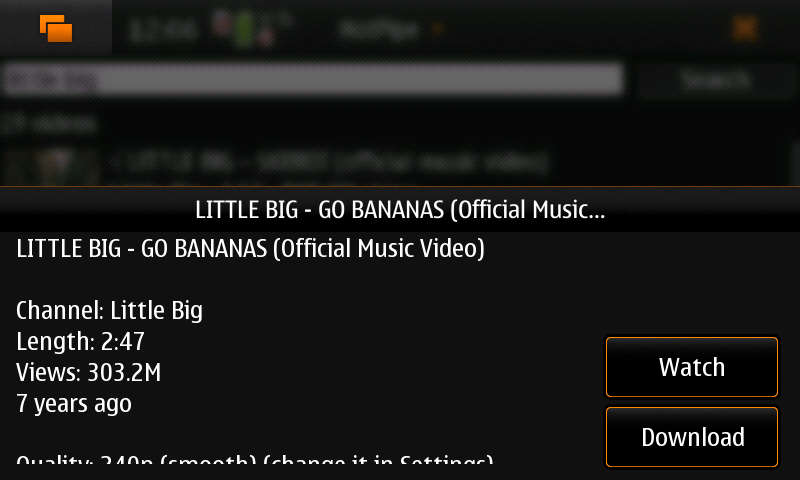
- Watch downloads the video into a cache and plays it. Download does the same, but joins the two streams into one MP4 in the Videos folder (so the file manager and any other player find it) and does not play it.
- The cache is a folder you can open,
MyDocs/Videos/NotPipe cache(withthumbsinside), on the memory card, not in RAM. Its size is a setting (400 MB by default, the oldest videos go first). - A √ before a title means the video is downloaded, ◊ that it is complete in the cache. Both play without the network: the cache keeps a small file with the title and the sizes, so Watch needs no question to the server. The menu Cached videos lists everything that plays offline.
- While one video downloads or plays, Watch and Download of other videos go into a queue, one at a time.
- Settings: video quality (144p to 480p), the sound (normal or small), the size of the cache.
(The Nokia fonts of the phone have no check mark, so the first version drew nothing at all. The two signs are the ones that exist in the font.)
What does not work, honestly
- It lives on a public Invidious server. We found one instance that answered at the time of testing (the others show a browser check, which we do not bypass, or an error), and the list of instances is fragile. NotPipe asks
api.invidious.iofor the list once a day, tries the instances one by one and says what happened. If none answers, nothing plays. - Some videos fail with HTTP 403. YouTube refuses the stream to the address of the instance. NotPipe tries another instance, but with one working instance that usually means the video is not available.
- A queued video that fails is tried once more at the end of the queue, and the reason is written to
~/.notpipe/hildon.log. - Memory. The phone has 245 MB and often only 5 to 20 MB free. A long video does not need more (the player reads the file), but keep the other applications closed.
- Only H.264 with AAC (what YouTube sends in MP4). No live streams, no channels or playlists yet, no streaming while downloading: the video must be downloaded before it plays.
- Tested on one phone.
Install it
After adding the repository, as root on the phone:
apt-get install notpipe-hildon # brings nplay, ffmpeg and python3-hildonlite (0.5.0 or newer)
Then look for NotPipe in the menu. nplay works alone, too: nplay video.mp4, or nplay picture.mp4 sound.mp4 for two files. The sources are in the main repository,
in apps/ffmpeg, apps/nplay and apps/notpipe-hildon. The new thumbnails in lists come from hildonlite 0.5.0.
Thanks to gohoski for notPipe and the idea, and to the people who run the Invidious instances.