The N900 clock that forgets the time: the backup battery
Take the main battery out of an N900 for a few seconds and the phone asks for the date and time at the next start. Many owners think that is just how the phone is. It is not: the N900 has a second, tiny battery that is meant to keep the clock running for months, and on most phones it is dead by now.
I have not done this repair myself. This is a summary of two threads on talk.maemo.org (links at the end), written so that the knowledge does not live only in a forum that can disappear. The soldering is on you and your phone. Read the whole text first, and if you have never soldered a tiny part, practise on something you do not mind breaking.
What happens and why
The processor does not keep time on its own. The clock (RTC) lives in the power chip, and it is kept alive when the main battery is out by a small rechargeable part next to the vibration motor and the power button.
The forum calls it the bupbat (backup battery). It is in the schematics as BKBAT, its typical voltage is 3.2 V and the service manual gives a capacity of just 15 µAh.

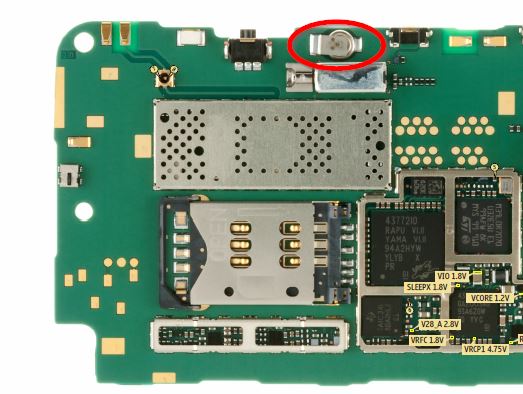
According to the author of the repair (joerg_rw), these parts break after 12 to 24 months of use, and some even leak. Another poster writes that they “all seem to die after one or two years”.
What the dead part costs you, in the words of the thread:
- the date and time are lost whenever the main battery is out (or empty for a while),
- an alarm set to switch the phone on from the off state is lost too,
- nothing else. A phone with a broken backup battery “works flawlessly” otherwise.
One more claim from the thread, that I could not verify: a faulty part may also drain the main battery faster. A poster who had this on another Nokia says replacing it fixed both. If your battery life is poor and the clock keeps resetting, it is a cheap thing to try.
First, the cheap options
- Live with it and set the clock. After a battery swap
ntp-sync(orntpd -swith the packageopenntpd) sets the time over the network, some people simply run it every time. - Remove the dead part. If you cannot solder a new one, taking the old one off is the least you can do (it may stop the drain and removes the risk of a leak). The phone then simply loses the time like a phone with a dead one.
- Replace it. The rest of this article.
Battery or capacitor?
The forum does not agree. The author of the repair calls the original a rechargeable lithium coin cell. Another poster insists it is a capacitor (“most devices have a 0.2 F 3 V capacitor instead of a battery”), and the schematic symbol is a battery
with the label 2.6/3.3V. It does not change the repair: what the replacement must do is hold about 3.3 V maximum and be charged by the phone.
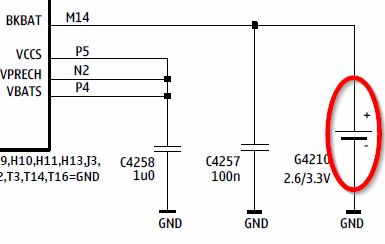
The power chip (TPS65950) accepts a backup supply between 1.8 V and 3.3 V (3.2 V typical):

The replacement part
The thread recommends a polyacene capacitor (a very small supercapacitor), because it should not break again in a year or two:
- Taiyo Yuden PAS414HR-VA5R: 0.06 F, 3.3 V, “staked coin” type (the original suggestion, 2013). It was out of production by 2016.
- ELNA DSK-414-HL: proposed in 2016 as a replacement and confirmed by the repair author as “a perfect match, though I didn’t check the exact specs”. The thread says Mouser and DigiKey stocked it then. Check availability and the dimensions yourself, “as long as it fits”.
- A poster notes that there is some room around the part, so a slightly bigger one may fit. Make sure it touches nothing else on the board.
The original supply of the author (25 pieces at a donation) has long been used up.
How to replace it
Tips from the author of the repair and from the people who did it:
- Iron: a strong one, at least about 40 W. The board is lead-free (RoHS), so it needs a higher temperature than old leaded solder. Ideally two irons, or soldering tweezers, to heat both feet of the part at once.
- Taking the old part off: push a thin piece of carton or steel/aluminium sheet under the foot while heating the foot until the solder melts.
- Cleaning: clean the pads with desoldering braid, use flux, tin the pads with a little leaded multicore solder (about 60/40, no thicker than 1 mm), and tin the feet of the new part.
- Soldering the new part: put it on the right way round (see the polarity in the schematic: the + side is the one on the
BKBATline), and heat each foot until the solder flows. A hot iron for a short time is better than a cooler one for a long time, because the part must not overheat. - No flux, no cheap solder: the author’s advice is not to try it without, unless you are an experienced solderer.
Risks. One poster tore the positive pad off the board while replacing the part (“clumsy me”). There is one alternative pad: the capacitor C4257 at position M8 is in parallel to the backup battery, so it can serve as the contact. Take your time with the unsoldering, and do not pull.
The charging must be switched on
This is the part many people miss. The power chip does not charge the backup battery by default: the charging bit (BBCHEN in the register BB_CFG) has to be set during boot, and a poster expected the bootloader to do it. A phone with a new part may then keep the time for only a short while.
One poster measured it on a phone with a new capacitor from the original batch: 5 minutes without the main battery the time was kept, 2 hours it was lost. The author of the repair then explained that a polyacene capacitor does not store as much as the original cell
(his estimate for the 0.07 F part: about a day in theory, perhaps 6 hours in practice), and recommended setting the register BB_CFG to 0b00011111 as early as possible after boot. Another poster gave the command:
i2cset -f -y 1 0x4b 0x12 0x1f b
You need the package i2c-tools (it is in Extras), run it as root. I have not tried it and I do not know whether the setting survives a reboot. In the thread it has to be repeated at every start, for example from a boot script
(the upstart job or /etc/init.d). If you test it, please tell me how it went.
The command writes into a register of the power chip. A wrong register or value could do harm: type it exactly, and only on a phone where you can accept the risk.
The sensible plan
- Check that the problem is yours: remove the main battery for a minute and see whether the date is reset.
- Decide whether it matters: if you do not mind setting the clock, do nothing.
- If you replace it, buy the part and a flux first, and watch a video of unsoldering small SMD parts.
- After the repair, set the charging with
i2csetand test: remove the main battery for 5 minutes, then for a few hours.
Where it comes from
- HW-FIX: losing time/date on battery swap? Replace bupbat, five pages of the thread by joerg_rw and others (2013 to 2020).
- Nokia N900 Back-Up Battery Replacement?, a short follow-up with the same recommendation (2013).
- The circuit diagrams and the service manual of the N900 (RX-51), originally meant for Nokia’s service centres. Nokia no longer sells or supports them, but the copies circulate: Nokia N900 RX-51 Schematics on Scribd (needs a Scribd account to download), Service Schematics RX-51 on ManualsLib and the RX-51 service manual on ManualMachine. A free, redrawn version made for the Neo900 project: n900-wip-2014061922.pdf (unofficial and unfinished). I link to them and do not host them.
- The pictures are excerpts from the circuit diagrams of the N900 (RX-51), its service manual and the data sheet of the TPS65950, they are shown here for illustration.
The forum is protected against automated readers, so I took the text from the Internet Archive copy, a page may be cut or out of date. If you repair your phone this way, I would be glad for a photo and a note.