The N900 emulator on your PC: no phone needed
Writing an app for the N900 is slow when every try means copying files to the phone. So the project has a development kit,
n900-devkit: a container with the ARM cross toolchain, the Fremantle sysroot and an emulated Hildon desktop that runs on a PC.
The programs are the real ARM programs: they run under qemu-user against the real GTK 2.14 and Hildon 2.2 libraries of Maemo 5, on a virtual 800x480 screen. You do not need a phone to get started.
What you get
- A top bar like the N900’s, an application switcher and a launcher, around your program, which gets 800x424 pixels below the bar, as on the phone.
- The real widgets (
HildonButton,HildonTreeView,HildonPannableArea…) and the real layout, so a window looks and behaves like on the phone, only slower. - Python 3.11 with hildonlite (Hildon windows through
ctypes), and C programs built with the cross compiler. - Scripted sessions for screenshots, and test suites that run in an emulated phone.
Set it up
You need a Linux PC with LXD and Workshop (Canonical’s tool for project containers), make, git and python3:
sudo snap install --channel=6/stable lxd && sudo lxd init
sudo snap install --classic workshop
Clone the kit and enter it:
git clone https://github.com/n900-resurrection/n900-devkit.git
cd n900-devkit
Then make the container and the toolchain, the sysroot and the overlays, and run a test program:
make up                # the container (about 10 s)
make toolchain         # cross compiler, qemu-user, Xvfb, window manager ... (a few minutes, apt in the container)
make sysroot           # the Maemo 5 SDK sysroot from the community mirrors (~90 MB)
make arm-python        # Python 3.11 and hildonlite for the N900, from this project's apt repository
make hildon-overlay    # icons, fonts, pango and a stand-in theme (downloaded)
make locale-overlay    # UTF-8 locales for glibc 2.5
make hildon-run SCRIPT=src/python3/hildon/proof.py SHOT=build/shot.png
On my machine make toolchain takes several minutes (it installs packages with apt) and everything else together about two minutes. The last command opens a window on the virtual screen and writes a screenshot after six seconds to build/shot.png
(the project folder is /project inside the container, so the file appears on your side). make without arguments lists everything the kit can do, and make clean-all takes you back to nothing
(it removes the container, the sysroot and the downloads, and asks first).
The desktop
Your own application goes in apps/<name>/ with a small hildon-run.sh (the next post builds one: Your first N900 GUI app in Python 3).
make hildon-run APP=<name> starts it in the desktop; make emulator shows the empty desktop with a launcher and a VNC server (port 5999 of the container), so you can tap it with a mouse in any VNC viewer.
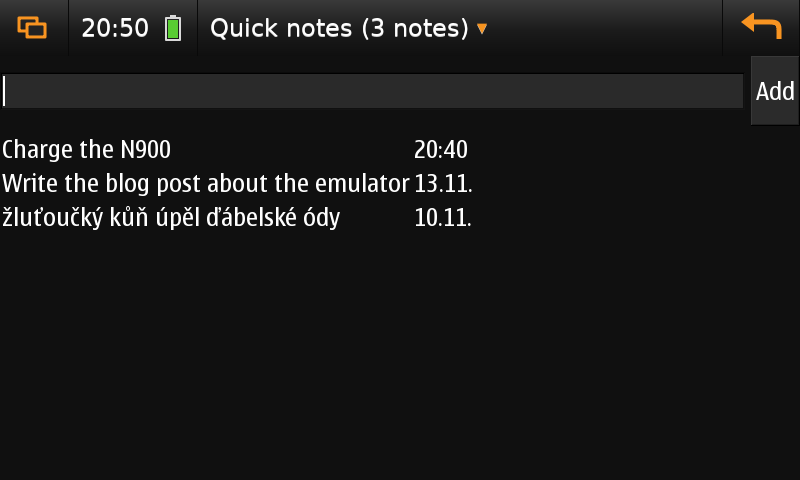
An example application, with the stand-in theme (no phone).
The orange button on the left cycles between the application, the switcher (a card with a picture of every running window, an X to close it) and the launcher (every application it knows):
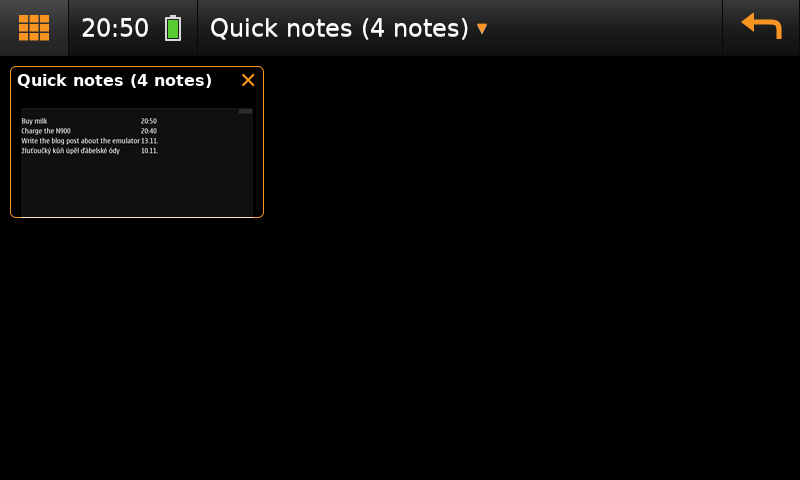
The switcher.
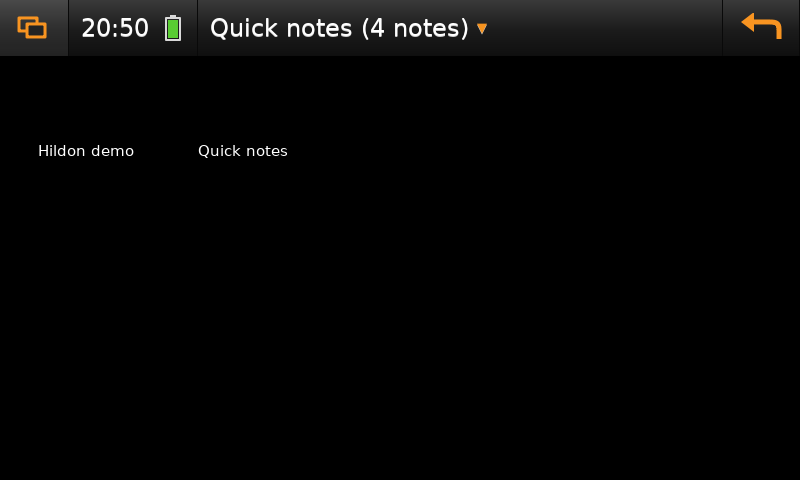
The launcher.
The title is the Menu button (the application menu of the active window; the key F4 does the same), and the orange arrow on the right is Back.
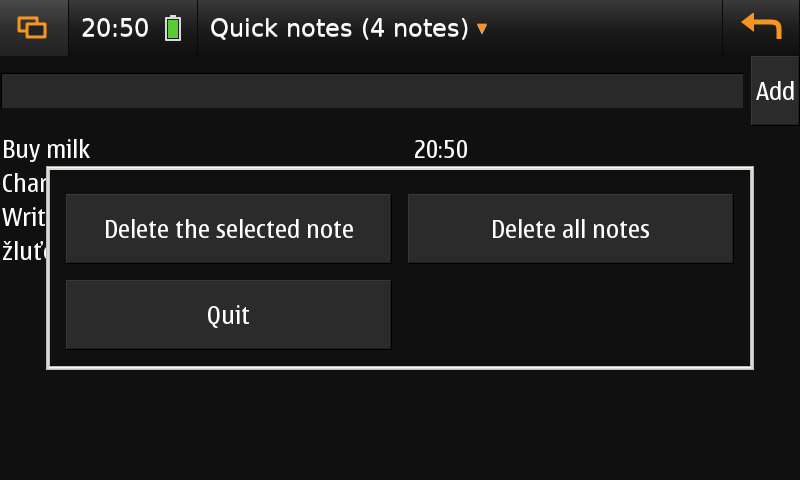
The application menu: HildonAppMenu.popup() shows nothing without hildon-desktop, so the emulator shows the items in a window of its own.
With and without a phone
The look of the N900, the Nokia theme “Digital Nature” and the font Nokia Sans, belongs to Nokia. The public Maemo mirrors do not serve it, and the kit does not store it. Without a phone the emulator therefore uses a stand-in: a dark theme of the kit (black, white text, an orange selection) and DejaVu Sans. That is plenty for the layout and the logic of a program.
With your own N900 on the network, run this once and the emulator uses the real theme and fonts from then on:
make hildon-overlay DEVICE=root@192.168.1.50 # theme, fonts, icons, Python 2.5 with PyGTK from the phone (~100 MB)
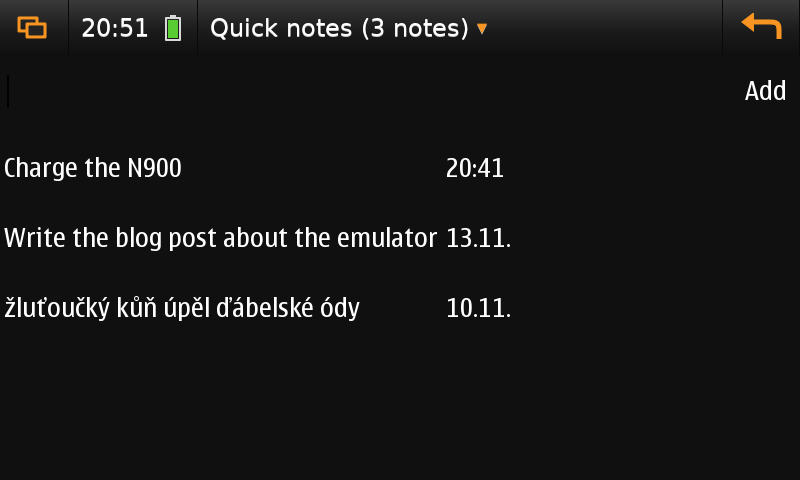
The same application with the theme and font copied from a phone.
What it cannot do
hildon-desktopdoes not run on a PC. It draws through clutter and OpenGL ES 2 on the PowerVR graphics, and nothing on a PC can run that. So there is no real status area, no widgets and no Maemo on-screen keyboard (the keyboard of the PC types). The only complete emulation was the old x86 Maemo SDK rootstrap, which is not downloadable any more.- It is slow: qemu emulates an ARM CPU, so starting Python takes seconds. Trust it for layout and logic, not for speed.
- Kinetic scrolling can be tried only roughly with a mouse; sensors, the camera and the real keyboard do not exist.
- Programs for Python 2.5 with PyGTK need the bindings from a phone (they are not on the mirrors).
More
The documentation of the kit is in the repository: docs/getting-started.md, docs/emulator.md, docs/cross-compile.md.
Everything here is written with Claude and tested on a clean clone of the kit, from make up to a screenshot. If a step does not work for you, please open an issue on GitHub.