<?xml version="1.0" encoding="utf-8"?><feed xmlns="http://www.w3.org/2005/Atom" xml:lang="en"><generator uri="https://jekyllrb.com/" version="3.10.0">Jekyll</generator><link href="https://n900-resurrection.github.io/feed.xml" rel="self" type="application/atom+xml" /><link href="https://n900-resurrection.github.io/" rel="alternate" type="text/html" hreflang="en" /><updated>2026-11-15T20:14:17+00:00</updated><id>https://n900-resurrection.github.io/feed.xml</id><title type="html">N900 Resurrection</title><subtitle>Modern software for the Nokia N900, ported, packaged and tested on real devices.</subtitle><entry><title type="html">The N900 emulator on your PC: no phone needed</title><link href="https://n900-resurrection.github.io/blog/2026/11/15/the-n900-emulator-on-your-pc/" rel="alternate" type="text/html" title="The N900 emulator on your PC: no phone needed" /><published>2026-11-15T00:00:00+00:00</published><updated>2026-11-15T00:00:00+00:00</updated><id>https://n900-resurrection.github.io/blog/2026/11/15/the-n900-emulator-on-your-pc</id><content type="html" xml:base="https://n900-resurrection.github.io/blog/2026/11/15/the-n900-emulator-on-your-pc/"><![CDATA[<p>Writing an app for the N900 is slow when every try means copying files to the phone. So the project has a development kit,
<a href="https://github.com/n900-resurrection/n900-devkit">n900-devkit</a>: a container with the ARM cross toolchain, the Fremantle sysroot and an <strong>emulated Hildon desktop</strong> that runs on a PC.
The programs are the real ARM programs: they run under <code class="language-plaintext highlighter-rouge">qemu-user</code> against the real GTK 2.14 and Hildon 2.2 libraries of Maemo 5, on a virtual 800x480 screen. You do not need a phone to get started.</p>

<h2 id="what-you-get">What you get</h2>
<ul>
  <li>A top bar like the N900’s, an <strong>application switcher</strong> and a <strong>launcher</strong>, around your program, which gets 800x424 pixels below the bar, as on the phone.</li>
  <li>The real widgets (<code class="language-plaintext highlighter-rouge">HildonButton</code>, <code class="language-plaintext highlighter-rouge">HildonTreeView</code>, <code class="language-plaintext highlighter-rouge">HildonPannableArea</code> …) and the real layout, so a window looks and behaves like on the phone, only slower.</li>
  <li>Python 3.11 with <a href="https://github.com/n900-resurrection/hildonlite">hildonlite</a> (Hildon windows through <code class="language-plaintext highlighter-rouge">ctypes</code>), and C programs built with the cross compiler.</li>
  <li>Scripted sessions for screenshots, and test suites that run in an emulated phone.</li>
</ul>

<h2 id="set-it-up">Set it up</h2>
<p>You need a Linux PC with LXD and Workshop (Canonical’s tool for project containers), <code class="language-plaintext highlighter-rouge">make</code>, <code class="language-plaintext highlighter-rouge">git</code> and <code class="language-plaintext highlighter-rouge">python3</code>:</p>

<div class="language-sh highlighter-rouge"><div class="highlight"><pre class="highlight"><code><span class="nb">sudo </span>snap <span class="nb">install</span> <span class="nt">--channel</span><span class="o">=</span>6/stable lxd <span class="o">&amp;&amp;</span> <span class="nb">sudo </span>lxd init
<span class="nb">sudo </span>snap <span class="nb">install</span> <span class="nt">--classic</span> workshop
</code></pre></div></div>

<p>Clone the kit and enter it:</p>

<div class="language-bash highlighter-rouge"><div class="highlight"><pre class="highlight"><code>git clone https://github.com/n900-resurrection/n900-devkit.git
<span class="nb">cd </span>n900-devkit
</code></pre></div></div>

<p>Then make the container and the toolchain, the sysroot and the overlays, and run a test program:</p>

<div class="language-sh highlighter-rouge"><div class="highlight"><pre class="highlight"><code>make up                <span class="c"># the container (about 10 s)</span>
make toolchain         <span class="c"># cross compiler, qemu-user, Xvfb, window manager ... (a few minutes, apt in the container)</span>
make sysroot           <span class="c"># the Maemo 5 SDK sysroot from the community mirrors (~90 MB)</span>
make arm-python        <span class="c"># Python 3.11 and hildonlite for the N900, from this project's apt repository</span>
make hildon-overlay    <span class="c"># icons, fonts, pango and a stand-in theme (downloaded)</span>
make locale-overlay    <span class="c"># UTF-8 locales for glibc 2.5</span>
make hildon-run <span class="nv">SCRIPT</span><span class="o">=</span>src/python3/hildon/proof.py <span class="nv">SHOT</span><span class="o">=</span>build/shot.png
</code></pre></div></div>

<p>On my machine <code class="language-plaintext highlighter-rouge">make toolchain</code> takes several minutes (it installs packages with apt) and everything else together about two minutes. The last command opens a window on the virtual screen and writes a screenshot after six seconds to <code class="language-plaintext highlighter-rouge">build/shot.png</code>
(the project folder is <code class="language-plaintext highlighter-rouge">/project</code> inside the container, so the file appears on your side). <code class="language-plaintext highlighter-rouge">make</code> without arguments lists everything the kit can do, and <code class="language-plaintext highlighter-rouge">make clean-all</code> takes you back to nothing
(it removes the container, the sysroot and the downloads, and asks first).</p>

<h2 id="the-desktop">The desktop</h2>
<p>Your own application goes in <code class="language-plaintext highlighter-rouge">apps/&lt;name&gt;/</code> with a small <code class="language-plaintext highlighter-rouge">hildon-run.sh</code> (the next post builds one: <a href="/blog/2026/11/15/your-first-n900-gui-app-in-python-3/">Your first N900 GUI app in Python 3</a>).
<code class="language-plaintext highlighter-rouge">make hildon-run APP=&lt;name&gt;</code> starts it in the desktop; <code class="language-plaintext highlighter-rouge">make emulator</code> shows the empty desktop with a launcher and a VNC server (port 5999 of the container), so you can tap it with a mouse in any VNC viewer.</p>

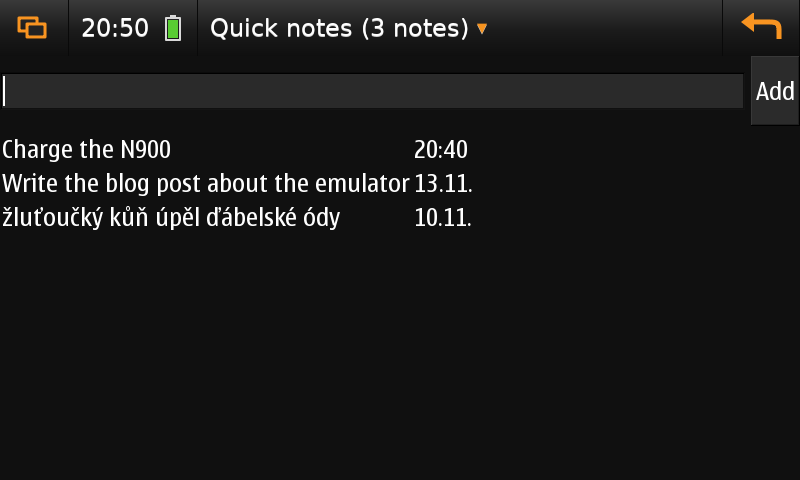
<p><img src="/assets/img/emulator-standin-list.png" alt="An application in the emulated desktop" /></p>

<p><em>An example application, with the stand-in theme (no phone).</em></p>

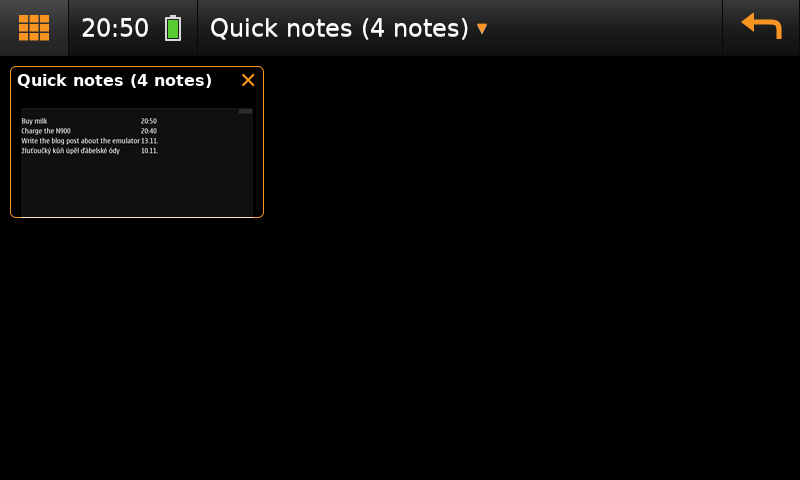
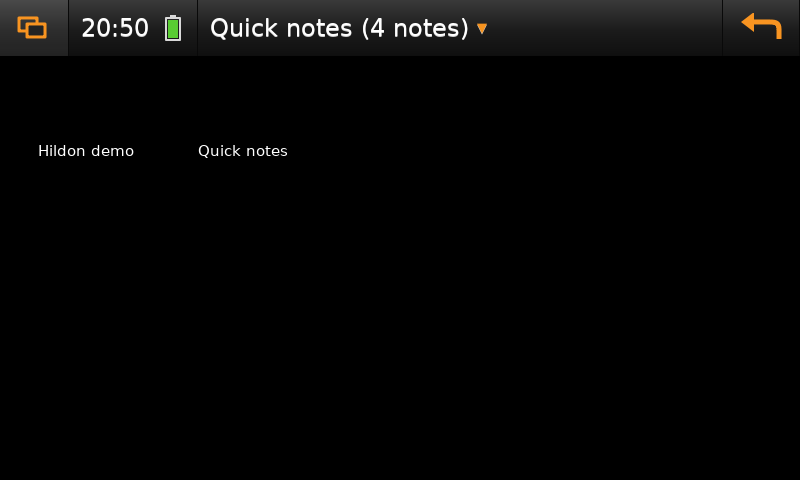
<p>The orange button on the left cycles between the application, the <strong>switcher</strong> (a card with a picture of every running window, an X to close it) and the <strong>launcher</strong> (every application it knows):</p>

<p><img src="/assets/img/emulator-standin-switcher.png" alt="The application switcher" /></p>

<p><em>The switcher.</em></p>

<p><img src="/assets/img/emulator-standin-launcher.png" alt="The launcher" /></p>

<p><em>The launcher.</em></p>

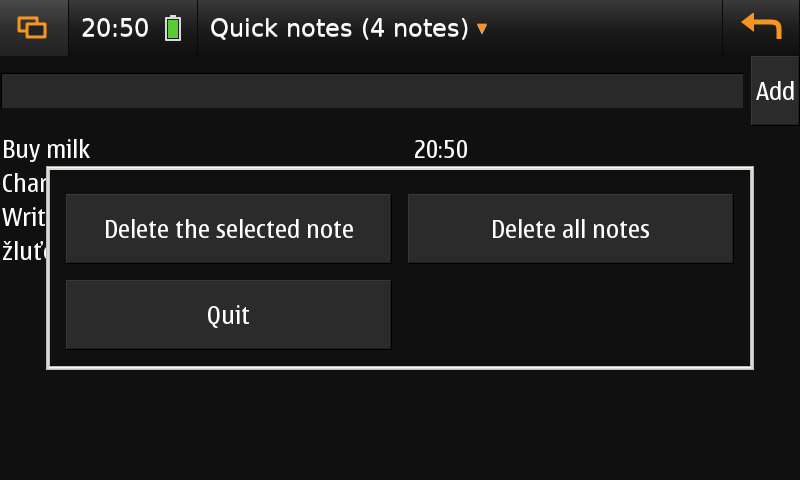
<p>The title is the <strong>Menu</strong> button (the application menu of the active window; the key F4 does the same), and the orange arrow on the right is <strong>Back</strong>.</p>

<p><img src="/assets/img/emulator-standin-menu.png" alt="The application menu" /></p>

<p><em>The application menu: <code class="language-plaintext highlighter-rouge">HildonAppMenu.popup()</code> shows nothing without <code class="language-plaintext highlighter-rouge">hildon-desktop</code>, so the emulator shows the items in a window of its own.</em></p>

<h2 id="with-and-without-a-phone">With and without a phone</h2>
<p>The look of the N900, the Nokia theme “Digital Nature” and the font Nokia Sans, belongs to Nokia. The public Maemo mirrors do not serve it, and the kit does not store it. Without a phone
the emulator therefore uses a <strong>stand-in</strong>: a dark theme of the kit (black, white text, an orange selection) and DejaVu Sans. That is plenty for the layout and the logic of a program.</p>

<p>With your own N900 on the network, run this once and the emulator uses the real theme and fonts from then on:</p>

<div class="language-sh highlighter-rouge"><div class="highlight"><pre class="highlight"><code>make hildon-overlay <span class="nv">DEVICE</span><span class="o">=</span>root@192.168.1.50        <span class="c"># theme, fonts, icons, Python 2.5 with PyGTK from the phone (~100 MB)</span>
</code></pre></div></div>

<p><img src="/assets/img/emulator-phone-theme-list.png" alt="The same application with the theme of the phone" /></p>

<p><em>The same application with the theme and font copied from a phone.</em></p>

<h2 id="what-it-cannot-do">What it cannot do</h2>
<ul>
  <li><strong><code class="language-plaintext highlighter-rouge">hildon-desktop</code> does not run on a PC.</strong> It draws through clutter and OpenGL ES 2 on the PowerVR graphics, and nothing on a PC can run that. So there is no real status area, no widgets and no Maemo
on-screen keyboard (the keyboard of the PC types). The only complete emulation was the old x86 Maemo SDK rootstrap, which is not downloadable any more.</li>
  <li>It is slow: qemu emulates an ARM CPU, so starting Python takes seconds. Trust it for layout and logic, not for speed.</li>
  <li>Kinetic scrolling can be tried only roughly with a mouse; sensors, the camera and the real keyboard do not exist.</li>
  <li>Programs for Python 2.5 with PyGTK need the bindings from a phone (they are not on the mirrors).</li>
</ul>

<h2 id="more">More</h2>
<p>The documentation of the kit is in the repository: <code class="language-plaintext highlighter-rouge">docs/getting-started.md</code>, <code class="language-plaintext highlighter-rouge">docs/emulator.md</code>, <code class="language-plaintext highlighter-rouge">docs/cross-compile.md</code>.
Everything here is written with Claude and tested on a clean clone of the kit, from <code class="language-plaintext highlighter-rouge">make up</code> to a screenshot. If a step does not work for you, please open an issue on GitHub.</p>]]></content><author><name>elPytel</name></author><category term="n900" /><category term="maemo" /><category term="emulator" /><category term="devkit" /><summary type="html"><![CDATA[Writing an app for the N900 is slow when every try means copying files to the phone. So the project has a development kit, n900-devkit: a container with the ARM cross toolchain, the Fremantle sysroot and an emulated Hildon desktop that runs on a PC. The programs are the real ARM programs: they run under qemu-user against the real GTK 2.14 and Hildon 2.2 libraries of Maemo 5, on a virtual 800x480 screen. You do not need a phone to get started.]]></summary></entry><entry><title type="html">Your first N900 GUI app in Python 3, tried in the emulator</title><link href="https://n900-resurrection.github.io/blog/2026/11/15/your-first-n900-gui-app-in-python-3/" rel="alternate" type="text/html" title="Your first N900 GUI app in Python 3, tried in the emulator" /><published>2026-11-15T00:00:00+00:00</published><updated>2026-11-15T00:00:00+00:00</updated><id>https://n900-resurrection.github.io/blog/2026/11/15/your-first-n900-gui-app-in-python-3</id><content type="html" xml:base="https://n900-resurrection.github.io/blog/2026/11/15/your-first-n900-gui-app-in-python-3/"><![CDATA[<p>The N900 can run a native Hildon application written in <strong>Python 3.11</strong>. There is a catch: PyGTK exists only for Python 2, and PyGObject needs GObject Introspection data that GTK 2 and Hildon do not have.
So an application has to call the C libraries through <code class="language-plaintext highlighter-rouge">ctypes</code>. <a href="https://github.com/n900-resurrection/hildonlite">hildonlite</a> does that for you in one pure-Python file:
windows, buttons, entries, lists, dialogs, the application menu, kinetic scrolling and timers.</p>

<p>This post builds a small application, <strong>Quick notes</strong>, and tries it in the emulator of the development kit
(set it up first: <a href="/blog/2026/11/15/the-n900-emulator-on-your-pc/">The N900 emulator on your PC</a>). The finished example is in the kit as <code class="language-plaintext highlighter-rouge">apps/quick-notes</code>.</p>

<h2 id="the-shortest-program">The shortest program</h2>
<div class="language-python highlighter-rouge"><div class="highlight"><pre class="highlight"><code><span class="kn">import</span> <span class="nn">hildonlite</span> <span class="k">as</span> <span class="n">hl</span>

<span class="n">hl</span><span class="p">.</span><span class="n">init</span><span class="p">()</span>
<span class="n">win</span> <span class="o">=</span> <span class="n">hl</span><span class="p">.</span><span class="n">Window</span><span class="p">(</span><span class="s">"Hello"</span><span class="p">)</span>
<span class="n">box</span> <span class="o">=</span> <span class="n">hl</span><span class="p">.</span><span class="n">VBox</span><span class="p">(</span><span class="n">spacing</span><span class="o">=</span><span class="mi">8</span><span class="p">)</span>
<span class="n">box</span><span class="p">.</span><span class="n">add</span><span class="p">(</span><span class="n">hl</span><span class="p">.</span><span class="n">Label</span><span class="p">(</span><span class="s">"Python 3 + Hildon"</span><span class="p">),</span> <span class="n">expand</span><span class="o">=</span><span class="bp">True</span><span class="p">)</span>
<span class="n">box</span><span class="p">.</span><span class="n">add</span><span class="p">(</span><span class="n">hl</span><span class="p">.</span><span class="n">Button</span><span class="p">(</span><span class="s">"Quit"</span><span class="p">,</span> <span class="s">"closes the window"</span><span class="p">,</span> <span class="n">on_clicked</span><span class="o">=</span><span class="k">lambda</span> <span class="n">b</span><span class="p">:</span> <span class="n">hl</span><span class="p">.</span><span class="n">quit</span><span class="p">()))</span>
<span class="n">win</span><span class="p">.</span><span class="n">add</span><span class="p">(</span><span class="n">box</span><span class="p">)</span>
<span class="n">win</span><span class="p">.</span><span class="n">show</span><span class="p">()</span>
<span class="n">hl</span><span class="p">.</span><span class="n">main</span><span class="p">()</span>
</code></pre></div></div>
<p>Save it as <code class="language-plaintext highlighter-rouge">hello.py</code> and run it on the virtual screen: <code class="language-plaintext highlighter-rouge">make hildon-run SCRIPT=hello.py SHOT=build/hello.png</code>.
On a phone you need <code class="language-plaintext highlighter-rouge">apt-get install python3-hildonlite</code> (how to add the repository: <a href="/blog/2026/11/14/using-the-n900-repository/">Using the N900 repository on the phone</a>).</p>

<h2 id="quick-notes-two-files-not-one">Quick notes: two files, not one</h2>
<p>A text field with an <strong>Add</strong> button on top, the notes below, a menu that deletes. I split it into</p>

<ul>
  <li><code class="language-plaintext highlighter-rouge">notes.py</code>, the <strong>data side</strong>: load and save a JSON file, add and remove a note. No GUI, so it can be tested on the PC in milliseconds,</li>
  <li><code class="language-plaintext highlighter-rouge">quick-notes</code>, the <strong>GUI</strong>: builds the window from hildonlite widgets, calls <code class="language-plaintext highlighter-rouge">notes.py</code> and saves after every change.</li>
</ul>

<p>That split is the habit worth keeping: the logic in a module that does not import the GUI, the GUI thin.</p>

<h3 id="the-data-side">The data side</h3>
<div class="language-python highlighter-rouge"><div class="highlight"><pre class="highlight"><code><span class="k">def</span> <span class="nf">add</span><span class="p">(</span><span class="n">notes</span><span class="p">,</span> <span class="n">text</span><span class="p">,</span> <span class="n">now</span><span class="o">=</span><span class="bp">None</span><span class="p">):</span>
    <span class="s">"""A new list with the note at the front; blank text adds nothing."""</span>
    <span class="n">text</span> <span class="o">=</span> <span class="s">" "</span><span class="p">.</span><span class="n">join</span><span class="p">(</span><span class="n">text</span><span class="p">.</span><span class="n">split</span><span class="p">())</span>
    <span class="k">if</span> <span class="ow">not</span> <span class="n">text</span><span class="p">:</span>
        <span class="k">return</span> <span class="nb">list</span><span class="p">(</span><span class="n">notes</span><span class="p">)</span>
    <span class="k">return</span> <span class="p">[{</span><span class="s">"text"</span><span class="p">:</span> <span class="n">text</span><span class="p">,</span> <span class="s">"ts"</span><span class="p">:</span> <span class="nb">int</span><span class="p">(</span><span class="n">time</span><span class="p">.</span><span class="n">time</span><span class="p">()</span> <span class="k">if</span> <span class="n">now</span> <span class="ow">is</span> <span class="bp">None</span> <span class="k">else</span> <span class="n">now</span><span class="p">)}]</span> <span class="o">+</span> <span class="nb">list</span><span class="p">(</span><span class="n">notes</span><span class="p">)</span>

<span class="k">def</span> <span class="nf">remove</span><span class="p">(</span><span class="n">notes</span><span class="p">,</span> <span class="n">index</span><span class="p">):</span>
    <span class="s">"""A new list without the note number `index` (an index out of range removes nothing)."""</span>
    <span class="k">if</span> <span class="ow">not</span> <span class="mi">0</span> <span class="o">&lt;=</span> <span class="n">index</span> <span class="o">&lt;</span> <span class="nb">len</span><span class="p">(</span><span class="n">notes</span><span class="p">):</span>
        <span class="k">return</span> <span class="nb">list</span><span class="p">(</span><span class="n">notes</span><span class="p">)</span>
    <span class="k">return</span> <span class="n">notes</span><span class="p">[:</span><span class="n">index</span><span class="p">]</span> <span class="o">+</span> <span class="n">notes</span><span class="p">[</span><span class="n">index</span> <span class="o">+</span> <span class="mi">1</span><span class="p">:]</span>

<span class="k">def</span> <span class="nf">save</span><span class="p">(</span><span class="n">notes</span><span class="p">,</span> <span class="n">path</span><span class="o">=</span><span class="bp">None</span><span class="p">):</span>
    <span class="s">"""Write the notes atomically (a file written in pieces would be lost when the battery is pulled)."""</span>
    <span class="n">path</span> <span class="o">=</span> <span class="n">path</span> <span class="ow">or</span> <span class="n">PATH</span>
    <span class="n">tmp</span> <span class="o">=</span> <span class="n">path</span> <span class="o">+</span> <span class="s">".new"</span>
    <span class="k">with</span> <span class="nb">open</span><span class="p">(</span><span class="n">tmp</span><span class="p">,</span> <span class="s">"w"</span><span class="p">,</span> <span class="n">encoding</span><span class="o">=</span><span class="s">"utf-8"</span><span class="p">)</span> <span class="k">as</span> <span class="n">f</span><span class="p">:</span>
        <span class="n">json</span><span class="p">.</span><span class="n">dump</span><span class="p">(</span><span class="n">notes</span><span class="p">,</span> <span class="n">f</span><span class="p">,</span> <span class="n">ensure_ascii</span><span class="o">=</span><span class="bp">False</span><span class="p">,</span> <span class="n">indent</span><span class="o">=</span><span class="mi">1</span><span class="p">)</span>
    <span class="n">os</span><span class="p">.</span><span class="n">replace</span><span class="p">(</span><span class="n">tmp</span><span class="p">,</span> <span class="n">path</span><span class="p">)</span>
</code></pre></div></div>
<p>Functions that return a new list are easy to test. <code class="language-plaintext highlighter-rouge">tests/test_notes.py</code> checks the order of notes, blank input, indexes out of range, Unicode (<code class="language-plaintext highlighter-rouge">žluťoučký kůň</code>) and a broken file:</p>

<div class="language-sh highlighter-rouge"><div class="highlight"><pre class="highlight"><code>python3 <span class="nt">-m</span> unittest discover <span class="nt">-s</span> apps/quick-notes/tests          <span class="c"># 6 tests, a few milliseconds, on the PC</span>
</code></pre></div></div>

<h3 id="the-gui">The GUI</h3>
<div class="language-python highlighter-rouge"><div class="highlight"><pre class="highlight"><code><span class="n">win</span> <span class="o">=</span> <span class="n">hl</span><span class="p">.</span><span class="n">Window</span><span class="p">(</span><span class="s">"Quick notes"</span><span class="p">)</span>
<span class="n">root</span> <span class="o">=</span> <span class="n">hl</span><span class="p">.</span><span class="n">VBox</span><span class="p">(</span><span class="n">spacing</span><span class="o">=</span><span class="mi">6</span><span class="p">)</span>

<span class="n">top</span> <span class="o">=</span> <span class="n">hl</span><span class="p">.</span><span class="n">HBox</span><span class="p">(</span><span class="n">spacing</span><span class="o">=</span><span class="mi">6</span><span class="p">)</span>                       <span class="c1"># the controls are on top, where the thumb reaches them
</span><span class="n">entry</span> <span class="o">=</span> <span class="n">top</span><span class="p">.</span><span class="n">add</span><span class="p">(</span><span class="n">hl</span><span class="p">.</span><span class="n">Entry</span><span class="p">(</span><span class="s">""</span><span class="p">),</span> <span class="n">expand</span><span class="o">=</span><span class="bp">True</span><span class="p">)</span>
<span class="n">top</span><span class="p">.</span><span class="n">add</span><span class="p">(</span><span class="n">hl</span><span class="p">.</span><span class="n">Button</span><span class="p">(</span><span class="s">"Add"</span><span class="p">,</span> <span class="n">on_clicked</span><span class="o">=</span><span class="k">lambda</span> <span class="n">b</span><span class="p">:</span> <span class="n">add</span><span class="p">()))</span>
<span class="n">root</span><span class="p">.</span><span class="n">add</span><span class="p">(</span><span class="n">top</span><span class="p">)</span>
<span class="n">store</span> <span class="o">=</span> <span class="n">hl</span><span class="p">.</span><span class="n">ListStore</span><span class="p">(</span><span class="mi">2</span><span class="p">)</span>                        <span class="c1"># two text columns: the note and its date
</span><span class="n">view</span> <span class="o">=</span> <span class="n">hl</span><span class="p">.</span><span class="n">ListView</span><span class="p">(</span><span class="n">store</span><span class="p">)</span>
<span class="n">area</span> <span class="o">=</span> <span class="n">hl</span><span class="p">.</span><span class="n">PannableArea</span><span class="p">()</span>
<span class="n">area</span><span class="p">.</span><span class="n">add</span><span class="p">(</span><span class="n">view</span><span class="p">)</span>                                 <span class="c1"># a ListView scrolls by itself: add, not add_viewport
</span><span class="n">root</span><span class="p">.</span><span class="n">add</span><span class="p">(</span><span class="n">area</span><span class="p">,</span> <span class="n">expand</span><span class="o">=</span><span class="bp">True</span><span class="p">)</span>

<span class="n">menu</span> <span class="o">=</span> <span class="n">hl</span><span class="p">.</span><span class="n">AppMenu</span><span class="p">()</span>
<span class="n">menu</span><span class="p">.</span><span class="n">add</span><span class="p">(</span><span class="s">"Delete the selected note"</span><span class="p">,</span> <span class="k">lambda</span> <span class="n">b</span><span class="p">:</span> <span class="n">delete_selected</span><span class="p">())</span>
<span class="n">menu</span><span class="p">.</span><span class="n">add</span><span class="p">(</span><span class="s">"Delete all notes"</span><span class="p">,</span> <span class="k">lambda</span> <span class="n">b</span><span class="p">:</span> <span class="n">clear_all</span><span class="p">())</span>
<span class="n">menu</span><span class="p">.</span><span class="n">add</span><span class="p">(</span><span class="s">"Quit"</span><span class="p">,</span> <span class="k">lambda</span> <span class="n">b</span><span class="p">:</span> <span class="n">hl</span><span class="p">.</span><span class="n">quit</span><span class="p">())</span>
<span class="n">win</span><span class="p">.</span><span class="n">set_menu</span><span class="p">(</span><span class="n">menu</span><span class="p">)</span>
<span class="n">win</span><span class="p">.</span><span class="n">add</span><span class="p">(</span><span class="n">root</span><span class="p">)</span>
</code></pre></div></div>
<p>The handlers are plain functions: <code class="language-plaintext highlighter-rouge">add()</code> reads the entry, calls <code class="language-plaintext highlighter-rouge">N.add</code>, saves, clears the field, redraws the list and shows a <code class="language-plaintext highlighter-rouge">hl.Banner(win, "Note added")</code>; <code class="language-plaintext highlighter-rouge">delete_selected()</code> uses
<code class="language-plaintext highlighter-rouge">view.selected()</code>; <code class="language-plaintext highlighter-rouge">clear_all()</code> asks with <code class="language-plaintext highlighter-rouge">hl.confirm(...)</code> before it deletes anything. The Return key adds a note too (<code class="language-plaintext highlighter-rouge">entry.on_key(...)</code>).</p>

<h2 id="try-it-in-the-emulator">Try it in the emulator</h2>
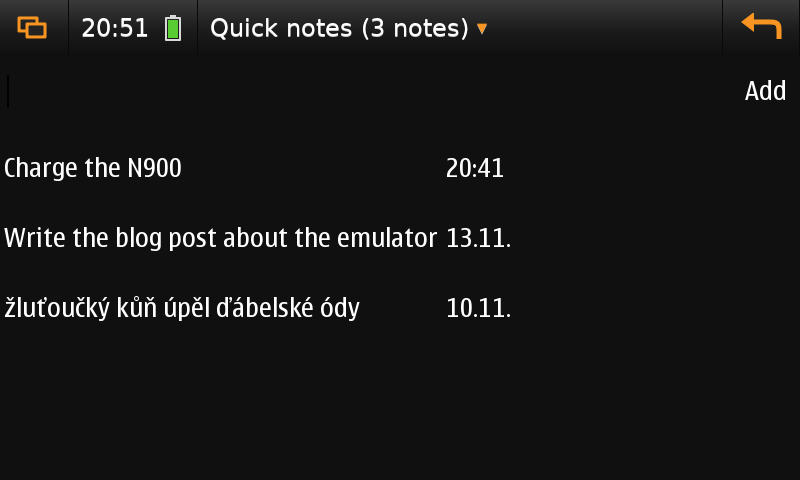
<p>The emulator needs to know how to start your application. That is <code class="language-plaintext highlighter-rouge">apps/quick-notes/hildon-run.sh</code>: it names the application, says which file to run, and puts demo notes into <code class="language-plaintext highlighter-rouge">/tmp</code>
so that your real notes are never touched:</p>

<div class="language-sh highlighter-rouge"><div class="highlight"><pre class="highlight"><code><span class="c"># Name: Quick notes</span>
<span class="nv">RUN_SCRIPT</span><span class="o">=</span><span class="s2">"</span><span class="nv">$APPS_DIR</span><span class="s2">/quick-notes/quick-notes"</span>
<span class="nb">export </span><span class="nv">QUICKNOTES_FILE</span><span class="o">=</span>/tmp/quick-notes-demo.json
</code></pre></div></div>
<p>Then:</p>
<div class="language-sh highlighter-rouge"><div class="highlight"><pre class="highlight"><code>make hildon-run <span class="nv">APP</span><span class="o">=</span>quick-notes <span class="nv">SHOT</span><span class="o">=</span>build/qn.png      <span class="c"># the application in the desktop, with the top bar</span>
</code></pre></div></div>

<p><img src="/assets/img/emulator-standin-list.png" alt="Quick notes in the emulator" /></p>

<h3 id="a-scripted-session">A scripted session</h3>
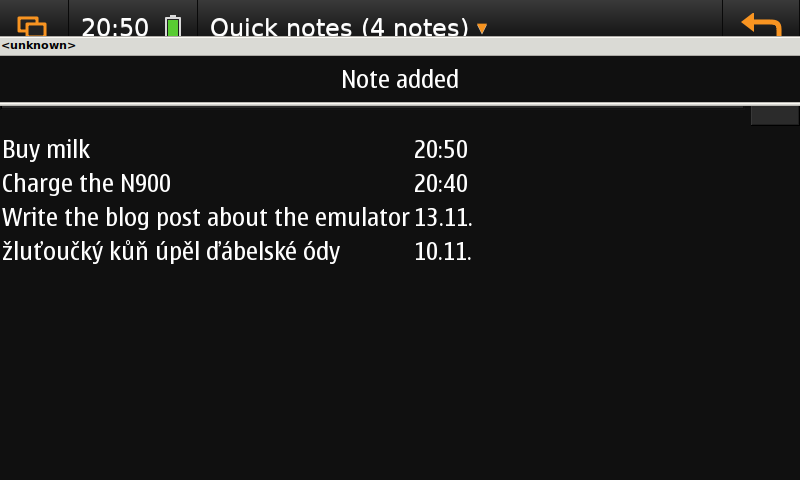
<p><code class="language-plaintext highlighter-rouge">make emu-shots APP=quick-notes</code> replays a list of steps from <code class="language-plaintext highlighter-rouge">apps/quick-notes/shots.txt</code> (seconds, action, arguments) and takes screenshots at the marked moments. The program starts fresh each time,
so the images are reproducible and you can compare them after a change:</p>

<div class="language-plaintext highlighter-rouge"><div class="highlight"><pre class="highlight"><code>10  shot list
11  click 300 90         # a tap on the text field
12  type Buy milk
13  click 765 90         # the Add button
15  shot added
27  key F4               # the application menu (Escape is Back)
30  shot menu
</code></pre></div></div>
<p><img src="/assets/img/emulator-standin-added.png" alt="After adding a note" /></p>

<p><em>After typing “Buy milk” and tapping Add: the note is on top, the title says 4 notes. The grey strip is the information banner of the emulator.</em></p>

<p>You can also click through it yourself: <code class="language-plaintext highlighter-rouge">make emulator</code> and connect with a VNC viewer to port 5999 of the container; the launcher shows <em>Quick notes</em>.</p>

<h2 id="on-the-phone">On the phone</h2>
<p>The program needs only <code class="language-plaintext highlighter-rouge">python3-hildonlite</code> on the phone:</p>

<div class="language-sh highlighter-rouge"><div class="highlight"><pre class="highlight"><code>scp <span class="nt">-r</span> apps/quick-notes root@&lt;phone&gt;:/home/user/quick-notes
ssh root@&lt;phone&gt; <span class="s1">'su user -c "DISPLAY=:0 /opt/python3/bin/python3 /home/user/quick-notes/quick-notes"'</span>
</code></pre></div></div>
<p>For a package with an icon in the menu you add a <code class="language-plaintext highlighter-rouge">.desktop</code> file; the <code class="language-plaintext highlighter-rouge">package.sh</code> files in <a href="https://github.com/n900-resurrection/nokia-n900-apps">nokia-n900-apps</a> show how.</p>

<h2 id="habits-of-a-native-feeling-app">Habits of a native-feeling app</h2>
<ul>
  <li><strong>Controls on top, big and few.</strong> A thumb covers the lower part of the screen: finger-sized buttons, and the main action in a row at the top.</li>
  <li><strong>Menu and banners.</strong> Rare actions go to the application menu, short feedback to a banner, and anything that deletes asks first (<code class="language-plaintext highlighter-rouge">hl.confirm</code>).</li>
  <li><strong>Never block the main loop.</strong> A long job in a handler freezes the window. Run it as a subprocess and poll with <code class="language-plaintext highlighter-rouge">hl.timeout()</code>, or call <code class="language-plaintext highlighter-rouge">hl.flush()</code> between the steps.</li>
  <li><strong>Save after every change, atomically.</strong> A phone can lose power at any moment.</li>
  <li><strong>Home directory, not <code class="language-plaintext highlighter-rouge">/tmp</code>.</strong> The <code class="language-plaintext highlighter-rouge">/tmp</code> of the N900 is a 1 MB tmpfs. Log errors to a file in your home directory: an application started from the menu has no terminal.</li>
  <li><strong>Finger scrolling:</strong> a <code class="language-plaintext highlighter-rouge">Label</code> inside <code class="language-plaintext highlighter-rouge">PannableArea.add_viewport</code> scrolls with the finger without selecting text, a <code class="language-plaintext highlighter-rouge">TextView</code> selects text when you drag.</li>
</ul>

<h2 id="known-quirks">Known quirks</h2>
<p>With the Hildon theme the selection of a <code class="language-plaintext highlighter-rouge">HildonTreeView</code> stays empty (a tap only activates a row), so <code class="language-plaintext highlighter-rouge">ListView.selected()</code> returns the row of the last tap. And <code class="language-plaintext highlighter-rouge">hildonlite</code> has no orientation switching yet:
the window is always 800x480 landscape. Both are in the README of hildonlite.</p>

<p>The kit, with this example and its documentation, is at <a href="https://github.com/n900-resurrection/n900-devkit">github.com/n900-resurrection/n900-devkit</a>.</p>]]></content><author><name>elPytel</name></author><category term="n900" /><category term="maemo" /><category term="python" /><category term="hildon" /><category term="devkit" /><summary type="html"><![CDATA[The N900 can run a native Hildon application written in Python 3.11. There is a catch: PyGTK exists only for Python 2, and PyGObject needs GObject Introspection data that GTK 2 and Hildon do not have. So an application has to call the C libraries through ctypes. hildonlite does that for you in one pure-Python file: windows, buttons, entries, lists, dialogs, the application menu, kinetic scrolling and timers.]]></summary></entry><entry><title type="html">Using the N900 repository on the phone</title><link href="https://n900-resurrection.github.io/blog/2026/11/14/using-the-n900-repository/" rel="alternate" type="text/html" title="Using the N900 repository on the phone" /><published>2026-11-14T00:00:00+00:00</published><updated>2026-11-14T00:00:00+00:00</updated><id>https://n900-resurrection.github.io/blog/2026/11/14/using-the-n900-repository</id><content type="html" xml:base="https://n900-resurrection.github.io/blog/2026/11/14/using-the-n900-repository/"><![CDATA[<p>The packages of this project are served as a normal apt repository on GitHub Pages: <a href="https://n900-resurrection.github.io/n900-repository">https://n900-resurrection.github.io/n900-repository</a>. A phone can use it like any apt source,
with one catch, explained below. This page is how I set it up on real N900s; I tested these exact steps on a clean second phone.</p>

<h2 id="why-two-packages-first">Why two packages first</h2>

<p>The apt of Maemo 5 (0.7.20) downloads <code class="language-plaintext highlighter-rouge">https://</code> addresses with its own method, which uses an old libcurl and OpenSSL 0.9.8: <strong>TLS 1.0 only</strong>. GitHub and most other servers refuse that
(<code class="language-plaintext highlighter-rouge">tlsv1 alert protocol version</code>). So before the repository can be added over HTTPS, apt needs a better <code class="language-plaintext highlighter-rouge">https</code> method. Two packages provide it:</p>

<ul>
  <li><strong><code class="language-plaintext highlighter-rouge">curl</code></strong>: curl 8 with TLS 1.2 and 1.3, which does the downloading;</li>
  <li><strong><code class="language-plaintext highlighter-rouge">apt-transport-curl</code></strong>: a short script that replaces the apt method <code class="language-plaintext highlighter-rouge">https</code> and runs that curl. The original method is moved aside with <code class="language-plaintext highlighter-rouge">dpkg-divert</code> and comes back when you remove the package.
Certificates are always verified.</li>
</ul>

<p>The script is written for <code class="language-plaintext highlighter-rouge">bash</code> and uses the GNU <code class="language-plaintext highlighter-rouge">mktemp</code> and <code class="language-plaintext highlighter-rouge">sha256sum</code>, so the package also needs two system packages: <strong><code class="language-plaintext highlighter-rouge">bash3</code></strong> (it provides <code class="language-plaintext highlighter-rouge">/bin/bash</code>) and <strong><code class="language-plaintext highlighter-rouge">coreutils-gnu</code></strong>
(the GNU tools in <code class="language-plaintext highlighter-rouge">/usr/bin/gnu</code>; BusyBox on the phone has no <code class="language-plaintext highlighter-rouge">sha256sum</code> and its <code class="language-plaintext highlighter-rouge">mktemp</code> refuses a call without a template). A reader found a phone that had neither, and the method failed there.</p>

<h2 id="step-0-check-the-prerequisites">Step 0: check the prerequisites</h2>

<p>As root on the phone, see whether the two system packages are installed:</p>

<div class="language-bash highlighter-rouge"><div class="highlight"><pre class="highlight"><code>dpkg <span class="nt">-l</span> bash3 coreutils-gnu | <span class="nb">grep</span> <span class="s1">'^ii'</span>
<span class="nb">ls</span> <span class="nt">-l</span> /bin/bash
</code></pre></div></div>

<p>If one is missing, install it first from the Extras repository (Application Manager, or <code class="language-plaintext highlighter-rouge">apt-get install bash3 coreutils-gnu</code> with the mirror from
<a href="/blog/2026/11/13/first-ssh-connection-to-the-n900/">First ssh connection</a>). Without them <code class="language-plaintext highlighter-rouge">dpkg -i</code> of <code class="language-plaintext highlighter-rouge">apt-transport-curl</code> in the next step refuses to install.</p>

<h2 id="step-1-install-curl-and-the-transport-by-hand">Step 1: install curl and the transport by hand</h2>

<p>apt cannot reach the repository yet, so these two files are installed by hand. Download them on the computer from the repository
(<a href="https://n900-resurrection.github.io/n900-repository/pool/main/curl/"><code class="language-plaintext highlighter-rouge">curl</code></a> and
<a href="https://n900-resurrection.github.io/n900-repository/pool/main/apt-transport-curl/"><code class="language-plaintext highlighter-rouge">apt-transport-curl</code></a>); take the newest version of each
(for <code class="language-plaintext highlighter-rouge">apt-transport-curl</code> that is <strong>0.1-1maemo4 or newer</strong>, see the Application Manager note below). Copy them to the phone (for example with <code class="language-plaintext highlighter-rouge">scp</code>, see
<a href="/blog/2026/11/13/first-ssh-connection-to-the-n900/">First ssh connection</a>; to <code class="language-plaintext highlighter-rouge">/home/user/</code>, not to MyDocs: that card is FAT and cannot run programs) and install them <strong>together, as root</strong>:</p>

<div class="language-bash highlighter-rouge"><div class="highlight"><pre class="highlight"><code>dpkg <span class="nt">-i</span> curl_8.23.0-1maemo1_armel.deb apt-transport-curl_0.1-1maemo4_armel.deb
</code></pre></div></div>

<p><code class="language-plaintext highlighter-rouge">apt-transport-curl</code> needs <code class="language-plaintext highlighter-rouge">curl</code>, <code class="language-plaintext highlighter-rouge">bash3</code>, <code class="language-plaintext highlighter-rouge">coreutils-gnu</code> and the system package <code class="language-plaintext highlighter-rouge">apt-transport-https</code> (a stock Maemo 5 has the last one). Make sure the <strong>clock is right</strong> (for example with <code class="language-plaintext highlighter-rouge">ntp-sync</code>), or the certificate check fails.</p>

<h2 id="step-2-add-the-source-and-update">Step 2: add the source and update</h2>

<div class="language-bash highlighter-rouge"><div class="highlight"><pre class="highlight"><code><span class="nb">echo</span> <span class="s2">"deb https://n900-resurrection.github.io/n900-repository fremantle main"</span> <span class="o">&gt;</span> /etc/apt/sources.list.d/n900.list
apt-get update
apt-get <span class="nb">install </span>htop3
</code></pre></div></div>

<p>The repository is <strong>not signed yet</strong>: apt prints <code class="language-plaintext highlighter-rouge">Ign ... Release.gpg</code> and asks for confirmation to install packages without verification. Answer yes, or use <code class="language-plaintext highlighter-rouge">apt-get install -y --force-yes &lt;package&gt;</code>.
The packages can be browsed on the <a href="/packages/">Packages page</a>.</p>

<h2 id="if-something-is-wrong">If something is wrong</h2>

<p>Run the check that comes with <code class="language-plaintext highlighter-rouge">apt-transport-curl</code> (as root):</p>

<div class="language-bash highlighter-rouge"><div class="highlight"><pre class="highlight"><code>apt-transport-curl-check
</code></pre></div></div>

<p>It prints the state of the installation and changes nothing: the three packages, the method files (<code class="language-plaintext highlighter-rouge">https</code> should be our script of about 5 kB, <code class="language-plaintext highlighter-rouge">https.distrib</code> the original of about 25 kB),
the handshake with apt, a test download over TLS, the clock, free memory, and the last lines of the method’s error log. The result is a list of <code class="language-plaintext highlighter-rouge">[ ok ]</code> and <code class="language-plaintext highlighter-rouge">[FAIL]</code> lines and a <code class="language-plaintext highlighter-rouge">RESULT:</code> line
that you can paste into a bug report. If <code class="language-plaintext highlighter-rouge">curl</code> is missing the method says so (<code class="language-plaintext highlighter-rouge">install the package curl</code>) instead of dying silently.</p>

<h2 id="the-application-manager">The Application Manager</h2>

<p><a href="https://n900-resurrection.github.io/n900-repository/n900-repository.install"><code class="language-plaintext highlighter-rouge">n900-repository.install</code></a> adds the catalogue to the built-in Application Manager and offers <code class="language-plaintext highlighter-rouge">apt-transport-curl</code>
(open the file from the file manager). The Application Manager pulls <code class="language-plaintext highlighter-rouge">curl</code> in as a dependency. Use <strong><code class="language-plaintext highlighter-rouge">apt-transport-curl</code> 0.1-1maemo4 or newer</strong> (the hang was fixed in 1maemo3, 1maemo4 adds the dependencies): up to 0.1-1maemo2 the Application Manager
could hang for ever on “Preparing installation”. The cause was a small race: the method wrote its first message to apt in two pieces (the lines, then the empty line that ends a message),
and the <code class="language-plaintext highlighter-rouge">apt-worker</code> of the Application Manager, woken by the first piece, read it, did not see the end of the message and never looked again. <code class="language-plaintext highlighter-rouge">apt-get</code> copes with a message in pieces, so
it worked in a terminal. Since 0.1-1maemo3 every message goes out in a single <code class="language-plaintext highlighter-rouge">write()</code>.</p>

<p>If the Application Manager still hangs for you, install with <code class="language-plaintext highlighter-rouge">apt-get</code> in a terminal and tell me what <code class="language-plaintext highlighter-rouge">apt-transport-curl-check</code> says.</p>

<h2 id="keep-the-list-of-repositories-short-and-alive">Keep the list of repositories short and alive</h2>

<p>Maemo 5 ships with addresses of repositories that no longer exist (<code class="language-plaintext highlighter-rouge">downloads.maemo.nokia.com</code>, <code class="language-plaintext highlighter-rouge">repository.maemo.org</code>, the Ovi store). Every refresh tries them, waits for DNS errors, refused
connections and timeouts, and the Application Manager sits on “Checking for updates” much longer than it should. A reader who traced such a hang found it mostly came from these dead sources,
and from the huge development indexes (Extras-devel is about 29 MB of text, Extras-testing about 9 MB; the apt cache shrank from 24 MB to 3.5 MB after they were switched off).</p>

<p>So my advice: <strong>remove every default repository and keep only the ones that are alive and that you trust</strong>: the Maemo mirror
<a href="/blog/2026/11/13/first-ssh-connection-to-the-n900/">plan9</a> (Extras; take Extras-testing and Extras-devel only when you need a package from there), this repository, and any other that is still maintained.
A repository you cannot name the owner of should not be on the list: every package is installed as root.</p>

<ul>
  <li><strong>apt</strong> (terminal): look at <code class="language-plaintext highlighter-rouge">/etc/apt/sources.list</code> and the files in <code class="language-plaintext highlighter-rouge">/etc/apt/sources.list.d/</code>, delete or comment out the dead lines, then <code class="language-plaintext highlighter-rouge">apt-get update</code>.</li>
  <li><strong>Application Manager</strong>: it regenerates <code class="language-plaintext highlighter-rouge">/etc/apt/sources.list.d/hildon-application-manager.list</code> from its catalogue files, so editing that file does not last. Turn entries off in its own list
(Application catalogues, then edit or delete), or, as the reader did, mark the built-in entries in <code class="language-plaintext highlighter-rouge">/etc/hildon-application-manager/catalogues</code> with <code class="language-plaintext highlighter-rouge">&lt;disabled/&gt;</code>:</li>
</ul>

<div class="language-xml highlighter-rouge"><div class="highlight"><pre class="highlight"><code><span class="nt">&lt;catalogue&gt;</span>
  <span class="nt">&lt;file&gt;</span>variant-catalogues<span class="nt">&lt;/file&gt;</span>
  <span class="nt">&lt;id&gt;</span>nokia-certified<span class="nt">&lt;/id&gt;</span>
  <span class="nt">&lt;disabled/&gt;</span>
<span class="nt">&lt;/catalogue&gt;</span>
</code></pre></div></div>

<p>(I have not tried this file edit myself; back it up first.) The old Nokia archives also report expired signing keys. That is a separate warning and not the cause of a hang.</p>

<h2 id="the-fast-application-manager">The Fast Application Manager</h2>

<p>The Fast Application Manager (<code class="language-plaintext highlighter-rouge">fapman</code>) keeps <strong>its own list of repositories</strong> (<code class="language-plaintext highlighter-rouge">/root/.fapman/repos.list</code>), not the system one. To see our packages there, add the line
<code class="language-plaintext highlighter-rouge">deb https://n900-resurrection.github.io/n900-repository fremantle main</code> to its repositories and refresh. It runs <code class="language-plaintext highlighter-rouge">apt-get</code>, so the HTTPS method above is used.</p>

<p>One more thing about versions: community packages from Extras (<code class="language-plaintext highlighter-rouge">mc</code>, <code class="language-plaintext highlighter-rouge">git</code>, <code class="language-plaintext highlighter-rouge">openssh</code>) carry an epoch <code class="language-plaintext highlighter-rouge">1:</code> in their versions (<code class="language-plaintext highlighter-rouge">1:4.8.14</code> sorts above <code class="language-plaintext highlighter-rouge">4.8.33</code>), which made apt and the Fast Application Manager
offer those old packages as “updates” to ours. Our packages of the same names now have the epoch <code class="language-plaintext highlighter-rouge">1:</code> too, so the real version numbers decide.</p>

<h2 id="known-limits">Known limits</h2>

<ul>
  <li>The repository is not signed yet.</li>
  <li>Some packages have a plain grey icon in the catalogue (they were packaged without one).</li>
  <li>Everything is tested on a few phones only. If something breaks for you, please tell me.</li>
</ul>]]></content><author><name>elPytel</name></author><category term="n900" /><category term="maemo" /><category term="apt" /><category term="repository" /><summary type="html"><![CDATA[The packages of this project are served as a normal apt repository on GitHub Pages: https://n900-resurrection.github.io/n900-repository. A phone can use it like any apt source, with one catch, explained below. This page is how I set it up on real N900s; I tested these exact steps on a clean second phone.]]></summary></entry><entry><title type="html">First ssh connection to the N900 (and the plan9 repository)</title><link href="https://n900-resurrection.github.io/blog/2026/11/13/first-ssh-connection-to-the-n900/" rel="alternate" type="text/html" title="First ssh connection to the N900 (and the plan9 repository)" /><published>2026-11-13T00:00:00+00:00</published><updated>2026-11-13T00:00:00+00:00</updated><id>https://n900-resurrection.github.io/blog/2026/11/13/first-ssh-connection-to-the-n900</id><content type="html" xml:base="https://n900-resurrection.github.io/blog/2026/11/13/first-ssh-connection-to-the-n900/"><![CDATA[<p>Most things on the N900 are easiest from a computer: copying files, running commands, building packages. For that you need an ssh server on the phone.
Nokia did not ship one, and since the official repositories are gone it has to be installed from somewhere else. This is the guide for a clean phone
(tested on a second N900 with Maemo 5, PR 1.3).</p>

<h2 id="what-you-need">What you need</h2>

<ul>
  <li>The N900 on <strong>Wi-Fi</strong> and with the <strong>right date and time</strong> (otherwise certificate checks fail).</li>
  <li>A <strong>terminal on the phone</strong> (the package <code class="language-plaintext highlighter-rouge">osso-xterm</code>, the X Terminal icon) and <strong>root</strong> (<code class="language-plaintext highlighter-rouge">sudo gainroot</code>, package <code class="language-plaintext highlighter-rouge">rootsh</code>). Both are in Extras (and on the plan9
mirror of step 1); if they are missing, install them with the Application Manager first. The commands of steps 1 and 2 are typed as root.</li>
  <li><code class="language-plaintext highlighter-rouge">ssh</code> and <code class="language-plaintext highlighter-rouge">ssh-copy-id</code> on the computer (Linux, macOS or WSL).</li>
</ul>

<h2 id="step-1-the-plan9-repository">Step 1: the plan9 repository</h2>

<p>The official <code class="language-plaintext highlighter-rouge">repository.maemo.org</code> is dead. The mirror <strong><code class="language-plaintext highlighter-rouge">maemo.plan9.de</code></strong> is alive, though: a snapshot of the whole repository from 2017 with a huge number of packages
(Extras, Extras-testing, the SDK and more). It has one advantage: it is plain <strong>HTTP</strong>, so even the old <code class="language-plaintext highlighter-rouge">https</code> method of apt, which cannot do modern TLS, is not needed.</p>

<p>Add the sources (through the Application Manager’s <em>Application catalogues</em>, or directly in a file). In a terminal as root:</p>

<div class="language-bash highlighter-rouge"><div class="highlight"><pre class="highlight"><code><span class="nb">cat</span> <span class="o">&gt;</span> /etc/apt/sources.list.d/plan9.list <span class="o">&lt;&lt;</span><span class="sh">'</span><span class="no">EOF</span><span class="sh">'
deb http://maemo.plan9.de/apt-mirror/mirror/repository.maemo.org/extras/ fremantle free non-free
deb http://maemo.plan9.de/apt-mirror/mirror/repository.maemo.org/extras-testing/ fremantle free non-free
deb http://maemo.plan9.de/apt-mirror/mirror/repository.maemo.org/extras-devel/ fremantle free non-free
</span><span class="no">EOF
</span>apt-get update
</code></pre></div></div>

<p><code class="language-plaintext highlighter-rouge">apt-get update</code> prints warnings like <code class="language-plaintext highlighter-rouge">GPG error ... NO_PUBKEY ...</code>. That is expected: the mirror has no key the phone knows. The packages download and install through <code class="language-plaintext highlighter-rouge">apt-get</code> normally.</p>

<blockquote class="warning">
  <p>This is a third-party mirror over HTTP, without signatures. Packages are installed as root and nobody verifies that they are faithful copies. I do the same on my own phones,
but you should know it. Be careful with <code class="language-plaintext highlighter-rouge">extras-devel</code>: it holds work in progress.</p>
</blockquote>

<h2 id="step-2-the-ssh-server-on-the-phone">Step 2: the ssh server on the phone</h2>

<p>The server is the package <code class="language-plaintext highlighter-rouge">openssh-server</code> (version 5.1) from Extras:</p>

<div class="language-bash highlighter-rouge"><div class="highlight"><pre class="highlight"><code>apt-get <span class="nb">install </span>openssh-server
</code></pre></div></div>

<p>Then set the <strong>root password</strong> and start the server:</p>

<div class="language-bash highlighter-rouge"><div class="highlight"><pre class="highlight"><code>passwd
/etc/init.d/ssh start
ps | <span class="nb">grep </span>sshd
</code></pre></div></div>

<p>Mind the last command: its output always includes the line of <code class="language-plaintext highlighter-rouge">grep sshd</code> itself. The server runs only when there is <strong>another</strong> line with <code class="language-plaintext highlighter-rouge">/usr/sbin/sshd -D</code>. If you see only the
<code class="language-plaintext highlighter-rouge">grep</code> line, the server is not running (I misread this on my first try).</p>

<p>After a reboot the server starts by itself (the upstart job <code class="language-plaintext highlighter-rouge">sshd</code>).</p>

<h2 id="step-3-the-address-of-the-phone">Step 3: the address of the phone</h2>

<p>On the phone:</p>

<div class="language-bash highlighter-rouge"><div class="highlight"><pre class="highlight"><code>ifconfig wlan0 | <span class="nb">grep</span> <span class="s2">"inet addr"</span>
</code></pre></div></div>

<p>Write the address down (for example <code class="language-plaintext highlighter-rouge">192.168.1.50</code>). It is a good idea to have the router give the phone a fixed address.</p>

<h2 id="step-4-connecting-from-the-computer">Step 4: connecting from the computer</h2>

<p>A naive <code class="language-plaintext highlighter-rouge">ssh root@192.168.1.50</code> ends like this today:</p>

<div class="language-plaintext highlighter-rouge"><div class="highlight"><pre class="highlight"><code>Unable to negotiate with 192.168.1.50 port 22: no matching host key type found. Their offer: ssh-rsa,ssh-dss
</code></pre></div></div>

<p>Current OpenSSH on the computer no longer allows the old key type <code class="language-plaintext highlighter-rouge">ssh-rsa</code> by default, and the server on the phone offers nothing else. The fix is to allow it <strong>for this one device</strong>
only. In <code class="language-plaintext highlighter-rouge">~/.ssh/config</code> on the computer:</p>

<div class="language-plaintext highlighter-rouge"><div class="highlight"><pre class="highlight"><code>Host n900
    HostName 192.168.1.50
    User root
    HostKeyAlgorithms +ssh-rsa
    PubkeyAcceptedAlgorithms +ssh-rsa
    SetEnv TERM=xterm
</code></pre></div></div>

<p>Now <code class="language-plaintext highlighter-rouge">ssh n900</code> is enough. The first connection asks whether to trust the key fingerprint: answer <code class="language-plaintext highlighter-rouge">yes</code>, then enter the root password from step 2.
(<code class="language-plaintext highlighter-rouge">SetEnv TERM=xterm</code> fixes the display in the terminal, the phone does not know newer terminal types.)</p>

<h2 id="a-key-instead-of-a-password">A key instead of a password</h2>

<p>You do not want to type the password every time, and above all you do not want the phone to accept a password login. Copy your public key:</p>

<div class="language-bash highlighter-rouge"><div class="highlight"><pre class="highlight"><code>ssh-copy-id n900
</code></pre></div></div>

<p>You enter the password for the last time. From then on <code class="language-plaintext highlighter-rouge">ssh n900</code> lets you in without one. If <code class="language-plaintext highlighter-rouge">ssh-copy-id</code> does not use the alias, add the two options by hand:
<code class="language-plaintext highlighter-rouge">ssh-copy-id -o HostKeyAlgorithms=+ssh-rsa -o PubkeyAcceptedAlgorithms=+ssh-rsa n900</code>.</p>

<h2 id="errors-i-ran-into">Errors I ran into</h2>

<table>
  <thead>
    <tr>
      <th>Error</th>
      <th>Cause and fix</th>
    </tr>
  </thead>
  <tbody>
    <tr>
      <td><code class="language-plaintext highlighter-rouge">Connection refused</code> on port 22</td>
      <td>The ssh server is not running or not installed. On the phone <code class="language-plaintext highlighter-rouge">ps \| grep sshd</code> (look for the second line) and <code class="language-plaintext highlighter-rouge">/etc/init.d/ssh start</code>.</td>
    </tr>
    <tr>
      <td><code class="language-plaintext highlighter-rouge">no matching host key type found</code></td>
      <td><code class="language-plaintext highlighter-rouge">HostKeyAlgorithms +ssh-rsa</code> is missing in <code class="language-plaintext highlighter-rouge">~/.ssh/config</code>, or you call <code class="language-plaintext highlighter-rouge">ssh</code> without the alias.</td>
    </tr>
    <tr>
      <td><code class="language-plaintext highlighter-rouge">Permission denied (publickey)</code> after changing the server</td>
      <td>The root password is not set (<code class="language-plaintext highlighter-rouge">passwd</code>), or the key is not in <code class="language-plaintext highlighter-rouge">/root/.ssh/authorized_keys</code>.</td>
    </tr>
    <tr>
      <td><code class="language-plaintext highlighter-rouge">Connection timed out</code></td>
      <td>Wrong address, the phone is asleep (Wi-Fi), or another subnet. Try <code class="language-plaintext highlighter-rouge">ping</code> and <code class="language-plaintext highlighter-rouge">ifconfig</code> on the phone.</td>
    </tr>
    <tr>
      <td><code class="language-plaintext highlighter-rouge">WARNING: REMOTE HOST IDENTIFICATION HAS CHANGED</code></td>
      <td>The phone was reinstalled and has a new server key. <code class="language-plaintext highlighter-rouge">ssh-keygen -R 192.168.1.50</code> and connect again.</td>
    </tr>
    <tr>
      <td><code class="language-plaintext highlighter-rouge">NO_PUBKEY</code> during <code class="language-plaintext highlighter-rouge">apt-get update</code></td>
      <td>Expected, the mirror has no key. Ignore it.</td>
    </tr>
  </tbody>
</table>

<h2 id="security">Security</h2>

<ul>
  <li>The 5.1 server dates from 2009 and allows <strong>root with a password</strong>. At home behind a router this is acceptable; on foreign Wi-Fi or on mobile data do not leave it running.</li>
  <li>After copying your key, turn passwords off: in <code class="language-plaintext highlighter-rouge">/etc/ssh/sshd_config</code> set <code class="language-plaintext highlighter-rouge">PasswordAuthentication no</code> and run <code class="language-plaintext highlighter-rouge">/etc/init.d/ssh restart</code>. Check first that the key login works.</li>
  <li>A modern ssh server (OpenSSH 10) is also in our repository as the package <code class="language-plaintext highlighter-rouge">openssh</code>. It lives in <code class="language-plaintext highlighter-rouge">/opt/openssh</code>, listens on port 2222, takes keys only, for the user <code class="language-plaintext highlighter-rouge">user</code>, and does not start by itself.
It is good for fine-tuning; for the first connection the system <code class="language-plaintext highlighter-rouge">openssh-server</code> is simpler.</li>
</ul>

<h2 id="what-next">What next</h2>

<p>Once you can reach the phone over ssh you can add our own repository with more packages: see <a href="/blog/2026/11/14/using-the-n900-repository/">Using the N900 repository</a>,
which explains why <code class="language-plaintext highlighter-rouge">apt-transport-curl</code> is needed for HTTPS.</p>]]></content><author><name>elPytel</name></author><category term="n900" /><category term="maemo" /><category term="ssh" /><category term="plan9" /><category term="apt" /><summary type="html"><![CDATA[Most things on the N900 are easiest from a computer: copying files, running commands, building packages. For that you need an ssh server on the phone. Nokia did not ship one, and since the official repositories are gone it has to be installed from somewhere else. This is the guide for a clean phone (tested on a second N900 with Maemo 5, PR 1.3).]]></summary></entry><entry><title type="html">Welcome to N900 Resurrection</title><link href="https://n900-resurrection.github.io/blog/2026/11/12/welcome/" rel="alternate" type="text/html" title="Welcome to N900 Resurrection" /><published>2026-11-12T00:00:00+00:00</published><updated>2026-11-12T00:00:00+00:00</updated><id>https://n900-resurrection.github.io/blog/2026/11/12/welcome</id><content type="html" xml:base="https://n900-resurrection.github.io/blog/2026/11/12/welcome/"><![CDATA[<p>This site follows the work on the Nokia N900: ported and packaged software, the apt repository on GitHub Pages, the tools that make building for Maemo 5 possible
in 2026, and what does not work. Most of it is written with Claude and tested on real phones.</p>

<p>More posts will follow; the first ones are about adding the repository to a phone, the cross-build setup, TLS on a 2009 device and the emulator.</p>]]></content><author><name>elPytel</name></author><category term="n900" /><category term="maemo" /><summary type="html"><![CDATA[This site follows the work on the Nokia N900: ported and packaged software, the apt repository on GitHub Pages, the tools that make building for Maemo 5 possible in 2026, and what does not work. Most of it is written with Claude and tested on real phones.]]></summary></entry></feed>